> For the complete documentation index, see [llms.txt](https://docs.verge.aero/llms.txt). Markdown versions of documentation pages are available by appending `.md` to page URLs; this page is available as [Markdown](https://docs.verge.aero/drone-show-software/verge-design-studio/interface/color-palette.md).
# Color Palette
The color palette provides tools for assigning and managing color across splines within a scene. It allows individual splines or groups of splines to be painted or batch-colored using solid colors or gradients, enabling consistent, precise control of color application.
The swatch panel expanded
The color swatch tool set panel
{% tabs %}
{% tab title="Paint tools" %}
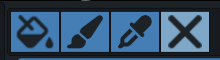
This set of tools provides high-level ways of coloring one or more splines or points in an element.
Paint Bucket
The paint bucket tool applies the currently selected color or gradient to all splines or points it is applied to.
Paint Brush
The paint brush tool applies color or gradients to splines on a per-segment or per-point basis. It allows precise, manual control over color placement, enabling detailed adjustments, blending, and localized edits within a scene.
dropper
The dropper tool samples color data from an existing spline, point, or scene element and sets it as the active color. This allows accurate color matching and reuse, ensuring consistency across painted elements and lighting animations.
Tool Deactivation
The X button exits the active color tool and returns input control to standard mouse interaction. This allows normal selection, navigation, and editing behavior without applying color or paint actions.
{% endtab %}
{% endtabs %}
| Parameter | Type | Description |
| ------------ | ------------ | ------------------------------------------------------------------------------ |
| None | | The element has no lighting. |
| Solid Colors | Color Source | A single, uniform light value is applied for the duration of the event. |
| Gradient | Color Source | Lighting transitions smoothly between two or more values across space or time. |
| Reference | Color Source | Lighting is driven by an external source or predefined lighting asset. |
## Creating, Editing, and Storing Colors
The color panel beneath the Color Type drop-down displays the currently active solid color or gradient. Selecting this panel opens the gradient editor, where colors can be created, modified, and managed using color stops, blend modes, and alpha keys. The editor also allows custom colors and gradients to be saved for reuse, enabling consistent and efficient color application across the scene.

 Paint Bucket
 Paint Brush
 dropper
 Tool Deactivation